
How Website Speed Affects SEO, User Experience, and Conversions
A software engineer's deep dive into Core Web Vitals, server response times, edge caching, and the direct mathematical link between speed and revenue.

- 1. Why Speed Matters: The Intersection of SEO and Revenue
- 2. Decoding Core Web Vitals: LCP, INP, and CLS
- 3. Mobile Network Latency & CPU Constraints
- 4. Modern Hosting, Edge CDNs & TTFB Optimization
- 5. Frontend Asset Engineering: Images, CSS & JavaScript
- 6. Backend Latency, API Optimization & Database Queries
- 7. How to Accurately Test & Benchmark Website Speed
- 8. The Web Performance Optimization Matrix
In modern web development, performance is not an afterthought; it is a fundamental architectural requirement. When a prospective client clicks your link from Google search results, you have less than three seconds to deliver a rendered, interactive experience before they abandon your site and navigate to a competitor. Search engines recognize this user behavior: Google has elevated page speed and Core Web Vitals into explicit ranking factors within its algorithmic ranking systems. Slower websites suffer a double penalty: they rank lower in organic search results and convert significantly fewer of the visitors who do arrive. This engineering guide deconstructs how website speed affects SEO, user experience, and revenue, providing actionable code-level strategies to achieve sub-second load times and flawless Core Web Vitals scores.
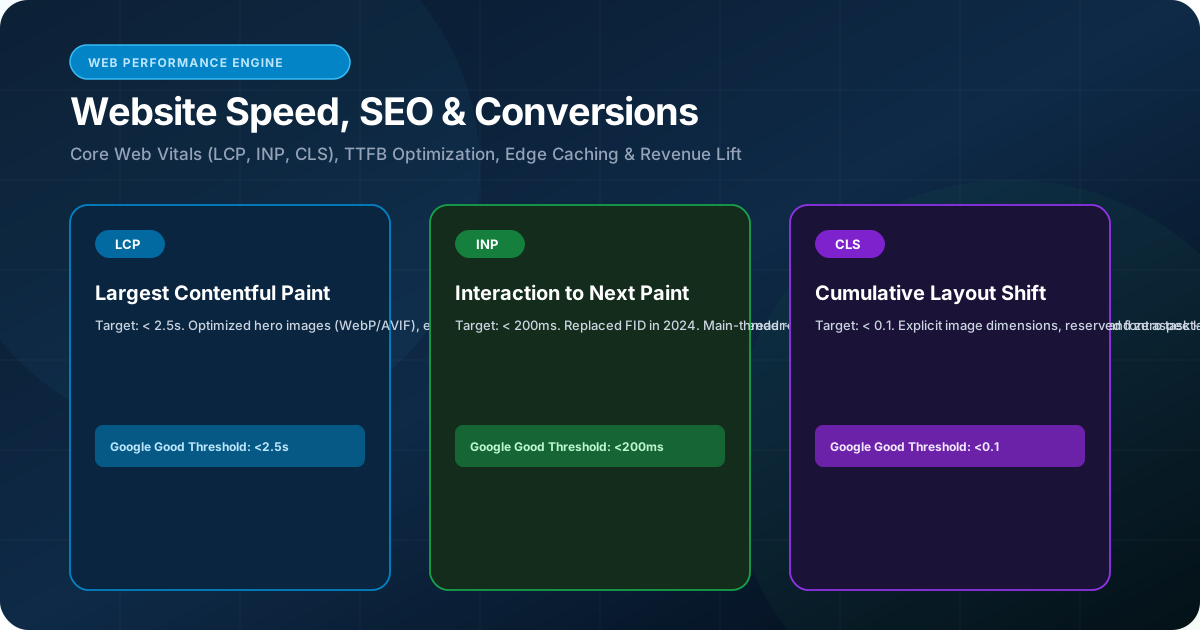
Website speed directly influences both Google organic search rankings and business conversion rates. Google treats Core Web Vitals—Largest Contentful Paint (LCP < 2.5s), Interaction to Next Paint (INP < 200ms), and Cumulative Layout Shift (CLS < 0.1)—as official ranking signals. Furthermore, empirical data shows that every additional second of mobile load latency increases bounce rates and reduces transaction conversion rates by significant margins.
1. Why Speed Matters: The Intersection of SEO and Revenue
The commercial reality of latency, bounce rates, and crawl budget
For years, web performance was viewed primarily as a user convenience. Today, web performance optimization is an indispensable pillar of commercial profitability and algorithmic search visibility.
From an SEO standpoint, slow server response times (TTFB > 800ms) degrade Google's crawl efficiency. Googlebot allocates a finite 'crawl budget' to every domain based on server responsiveness. When your server responds slowly, Googlebot crawls fewer pages per visit, delaying the discovery and indexing of newly published content.
From a conversion standpoint, latency destroys momentum. Numerous industry benchmarks demonstrate that every additional 100 milliseconds of latency can diminish conversion rates, while pages taking over 4 seconds to load experience bounce rates exceeding 50%. Speed directly preserves your marketing spend and accelerates customer acquisition.
Google incorporates real-world Core Web Vitals metrics gathered from millions of actual Chrome users (via the Chrome User Experience Report, or CrUX). Your rankings depend on real-world field data, not just isolated synthetic lab tests.
2. Decoding Core Web Vitals: LCP, INP, and CLS
Mastering Google's three definitive user experience metrics
Google evaluates website user experience through three precise Core Web Vitals metrics:
Largest Contentful Paint (LCP): Measures perceived loading speed. LCP marks the exact point in the page load timeline when the main content (typically a hero banner, video poster, or large text block) has fully rendered. To achieve a 'Good' rating from Google, your LCP must occur within 2.5 seconds on the 75th percentile of mobile visits.
Interaction to Next Paint (INP): Replaced First Input Delay (FID) as an official Core Web Vital in March 2024. INP measures overall page responsiveness throughout a user's entire session by tracking the latency of all click, tap, and keyboard interactions. A 'Good' INP score is 200 milliseconds or less.
Cumulative Layout Shift (CLS): Evaluates visual stability. CLS quantifies unexpected layout shifts that occur as fonts, images, or third-party banners load asynchronously without reserved DOM dimensions. A 'Good' CLS score is 0.1 or lower.
3. Mobile Network Latency & CPU Constraints
Optimizing for low-end mobile devices and cellular radio latency
Most developers build and test websites on high-end desktop workstations connected to high-speed fiber internet. In reality, over 65% of organic search traffic originates from mobile devices operating over cellular 4G/5G networks with variable radio latency and thermally throttled mobile CPUs.
Mobile devices struggle with heavy JavaScript execution. A 1MB JavaScript bundle that executes in 200ms on an Apple M3 laptop can freeze a mid-tier Android phone's main thread for 4.5 seconds, creating massive INP penalties and frustrating users.
Building high-performance mobile experiences requires prioritizing lightweight server-rendered HTML (via Next.js), minimizing third-party script bloat, and tree-shaking unused dependencies from your production bundle.
4. Modern Hosting, Edge CDNs & TTFB Optimization
Moving compute and content closer to global end-users
Traditional shared hosting environments and unoptimized monolithic servers struggle under concurrent traffic spikes, introducing severe Time to First Byte (TTFB) delays that choke Core Web Vitals.
Modern web engineering leverages global Content Delivery Networks (CDNs) and edge computing platforms (such as Vercel, Cloudflare, and AWS CloudFront). By caching statically generated HTML, CSS, and optimized images across hundreds of worldwide edge nodes, incoming HTTP requests are fulfilled from the data center closest to the user.
Furthermore, adopting modern transport protocols like HTTP/2 and HTTP/3 multiplexes multiple asset requests over a single TCP/QUIC connection, eliminating the head-of-line blocking that plagued legacy HTTP/1.1 servers.
5. Frontend Asset Engineering: Images, CSS & JavaScript
Aggressive reduction of payload size and critical render-path bottlenecks
Frontend assets—specifically unoptimized images, render-blocking stylesheets, and bloated JavaScript libraries—account for over 80% of total page weight on average websites.
Image Optimization: Replace legacy PNG and JPEG formats with next-generation AVIF and WebP formats, which deliver 40% to 60% smaller file sizes at identical visual fidelity. Always declare explicit `width` and `height` attributes to prevent layout shifts (CLS), and implement modern responsive `srcset` attributes so mobile viewports never download desktop-sized assets.
CSS Optimization: Eliminate render-blocking stylesheets by extracting and inlining critical above-the-fold styles directly into the HTML `<head>`, while deferring non-critical utility classes. Modern frameworks like Tailwind CSS v4 automatically compile minimal, pre-purged CSS bundles.
JavaScript Optimization: Defer or asynchronously load non-essential scripts (such as analytics, heatmaps, and chat widgets). Use dynamic imports and code-splitting to ensure users only download the JavaScript required for the specific page they are viewing.
6. Backend Latency, API Optimization & Database Queries
Eliminating server bottlenecks before the HTML ever reaches the browser
For dynamic, data-driven web applications (such as ecommerce portals or custom SaaS dashboards), sluggish load times often originate within backend database queries and third-party API dependencies.
Unindexed database queries, N+1 query patterns, and redundant database roundtrips inflate server response times past the 1,000ms mark, guaranteeing an LCP failure before client rendering even begins.
Implement high-performance in-memory caching layers using Redis, utilize connection pooling for PostgreSQL/MongoDB, and employ stale-while-revalidate (SWR) caching strategies so repeat requests serve instant data while background workers refresh the cache.
7. How to Accurately Test & Benchmark Website Speed
Leveraging synthetic lab tools versus real-world CrUX field data
Accurate speed optimization requires distinguishing between synthetic lab data (controlled, simulated tests) and real-world field data (measurements from actual visitors).
Google PageSpeed Insights: Combines synthetic Lighthouse lab audits with real-world Chrome User Experience Report (CrUX) field data. Pay primary attention to the 75th percentile Core Web Vitals assessment.
WebPageTest: The gold standard for deep engineering diagnostics. Allows testing from specific geographic locations, devices, and connection throttles, providing waterfall charts that reveal script execution bottlenecks and connection handshakes.
Google Search Console (Core Web Vitals Report): Aggregates your entire domain's field performance, categorizing URLs as 'Good', 'Needs Improvement', or 'Poor'.
8. The Web Performance Optimization Matrix
Engineering targets, metrics, and actionable remediation steps
Use this matrix to guide your development team through a systematic speed optimization sprint.
| Core Metric | Target Threshold | Primary Cause of Delay | Engineering Remediation |
|---|---|---|---|
| LCP (Largest Contentful Paint) | < 2.5s on mobile | Slow server TTFB, uncompressed hero banner, render-blocking CSS | Preload hero image; inline critical CSS; serve AVIF/WebP; enable edge CDN caching |
| INP (Interaction to Next Paint) | < 200ms across session | Main-thread blocking JavaScript; heavy event handlers | Break long tasks (>50ms); defer non-critical JS; optimize React re-renders |
| CLS (Cumulative Layout Shift) | < 0.1 | Unsized images; dynamic banner injections; late web fonts | Add explicit width/height; reserve layout space; use font-display: swap |
| TTFB (Time to First Byte) | < 800ms (ideal < 300ms) | Uncached backend queries; cold serverless starts; shared hosting | Deploy edge caching; Redis query cache; optimize database indexes |
| Total Page Weight | < 1.5MB total mobile payload | Bloated multi-megabyte images, unpurged CSS libraries | Modern compression; tree-shaking; remove unused dependencies |
The Bottom Line & Next Steps
Website speed is not a superficial vanity metric; it is an algorithmic necessity and a direct multiplier of commercial revenue. By optimizing Core Web Vitals, transitioning to modern server-side architectures like Next.js, deploying global edge caching, and rigorously eliminating frontend asset bloat, your business can achieve sub-second speeds that delight users and dominate search rankings. At RankVRA, our software engineers build high-performance web applications engineered for speed, search dominance, and maximum conversion rates. Explore our web optimization and development services today.
Questions Business Leaders Ask About website speed and SEO
How does page speed directly affect Google rankings?▾
Google uses Core Web Vitals (LCP, INP, CLS) as an official page experience ranking signal. Faster websites enjoy higher crawl efficiency, lower bounce rates, and a measurable ranking advantage over slower competitors when content relevance is comparable.
What is the difference between lab data and field data in PageSpeed Insights?▾
Lab data is collected in a controlled environment with predefined device and network settings, making it ideal for debugging. Field data reflects actual user experiences gathered from millions of real Chrome users over the previous 28-day period and is what Google's ranking algorithms evaluate.
Why did Interaction to Next Paint (INP) replace First Input Delay (FID)?▾
FID only measured the delay of the very first user interaction during page load. INP provides a vastly more comprehensive assessment by monitoring the latency of all interactions (clicks, taps, keystrokes) across the user's entire session on the page.
Can large images ruin my Core Web Vitals scores?▾
Yes. Oversized, uncompressed images are the leading cause of poor LCP scores. Serving modern WebP or AVIF formats with responsive dimensions and proper caching can cut image payloads by up to 70% and dramatically accelerate load times.
Does WordPress or Next.js offer better performance for website speed?▾
Modern frameworks like Next.js consistently outperform traditional WordPress monoliths because Next.js utilizes server-side rendering, automatic code-splitting, zero-runtime CSS compilation, and edge routing without the weight of dozens of third-party plugins.
How can RankVRA help optimize my website's performance?▾
RankVRA provides code-level web performance engineering. We rewrite slow database queries, optimize JavaScript bundles, implement edge caching, and fine-tune Core Web Vitals to deliver sub-second loading speeds across mobile and desktop devices.

Written by Naveen Panchal
AuthorFounder & Lead Technical Architect, RankVRA
Naveen Panchal is the Founder and Technical Director of RankVRA. He specializes in full-stack web engineering, Next.js architecture, and algorithmic search optimization for high-growth enterprises.
Explore Core Commercial Capabilities
- web.dev by Google: web.dev: Learn Core Web VitalsOfficial Reference
- Google Developers: Google PageSpeed Insights DocumentationOfficial Reference
- MDN Web Docs: MDN Web Performance GuideOfficial Reference
Is a Slow Website Costing You Rankings and Sales?
Do not let sluggish load times and failing Core Web Vitals drain your marketing ROI. Partner with RankVRA's performance engineers to achieve sub-second speeds and flawless technical health.
Related Growth Blueprints
Explore more strategic articles from the RankVRA engineering desk.

Technical SEO Checklist: 25 Critical Fixes for Your Website
Use this comprehensive 25-point technical SEO checklist to fix crawl errors, optimize Core Web Vitals, resolve indexation issues, and boost Google rankings.
Website Development Guide: How to Build a High-Converting Business Website
Learn how to build a high-converting business website. Master modern UX design, responsive development, Core Web Vitals, and review our launch checklist.
How to Improve Your Google Rankings: A Complete SEO Guide for Businesses
Learn how to improve Google rankings with this complete SEO guide for businesses. Discover proven strategies for technical SEO, content quality, and backlinks.
SEO for Small Businesses: A Practical Strategy to Get More Customers from Google
Discover a practical, affordable SEO strategy for small businesses. Follow our 90-day plan to optimize Google Business Profile, rank for local searches, and get leads.